An employer is the legal entity that employs a crew member — usually the yacht-owning company or a crew employment company. Every crew member you pay must be linked to an employer, and each employer must be connected to the correct payroll provider account so payroll runs against the right entity.
Why employers matter
Employers determine which payroll provider account a run belongs to, how funding requests are grouped, and which entity appears on payment instructions. Set them up before you link crew or run a cycle.
Create an employer and link it to a payroll provider
- Open the Crew module
From your Fleet account, click the Modules icon and select Crew.
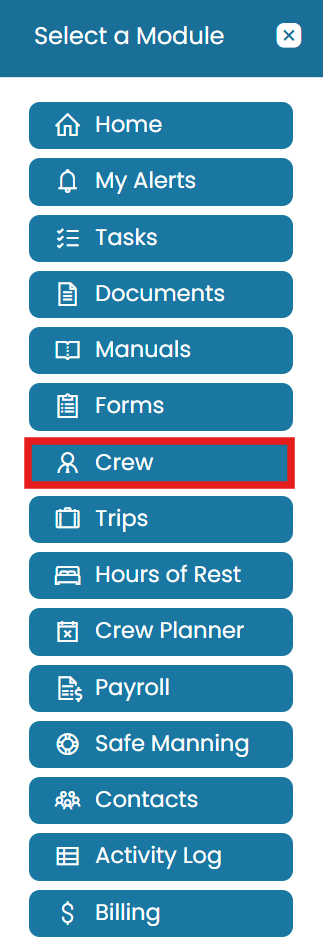
Open the Modules icon and select Crew - Go to Employers
Navigate to the Administration tab and select Employers.
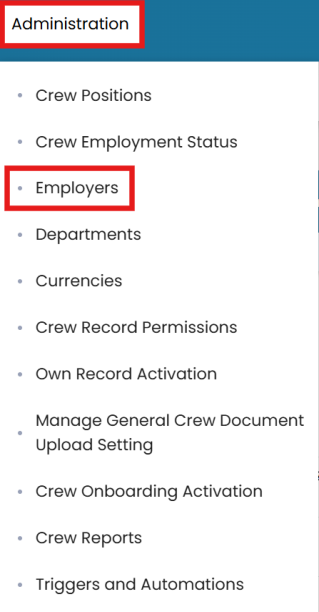
Administration tab with Employers selected - Start a new employer
Click the three dots and choose New Employer.
- Enter the employer details
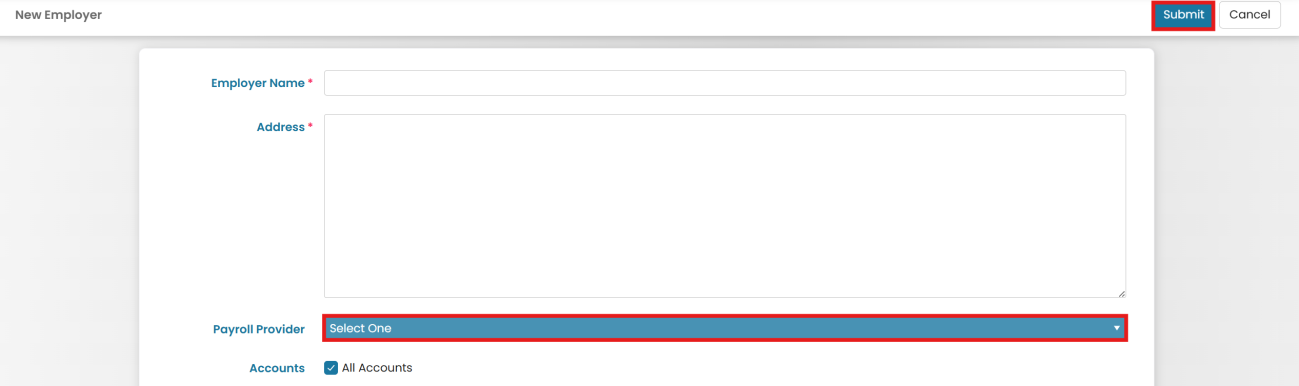
Enter the employer's name and address information.
- Link to a payroll provider
Select the payroll provider from the dropdown menu, then choose the account to which the employer will be applied.
Choose New Employer from the three-dot menu 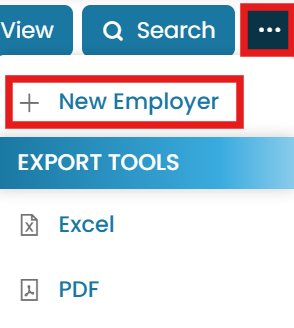
Select the payroll provider and account, then Submit - Submit
Once completed, click Submit.
Common questions
How do I create an employer?
What is an employer in payroll?
How do I connect an employer to the right payroll provider?
Do I create employers before linking crew?
Is there a video for creating employers?
Still stuck on this step?
Our payroll support team will pick it up as a Zendesk ticket and reply by email.