Control which crew mandatory documents are visible to the payroll provider. Use this to expose only the documents a payroll provider needs while keeping everything else private.
Set document visibility for payroll providers
- Open Documents
Click the Modules menu and select Documents.
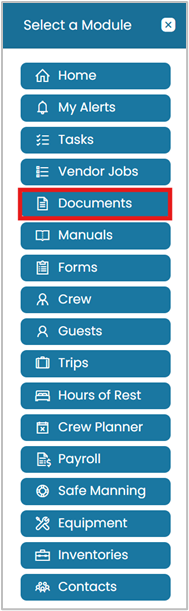
Open the Modules menu and select Documents - Open Crew Mandatory Documents
On the blue ribbon, click Administration then select Crew Mandatory Documents.
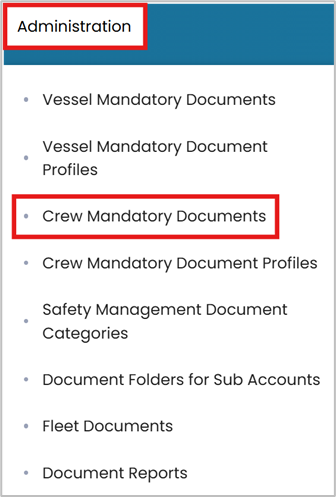
Administration → Crew Mandatory Documents - View a document
Click the View Details icon next to the document title.
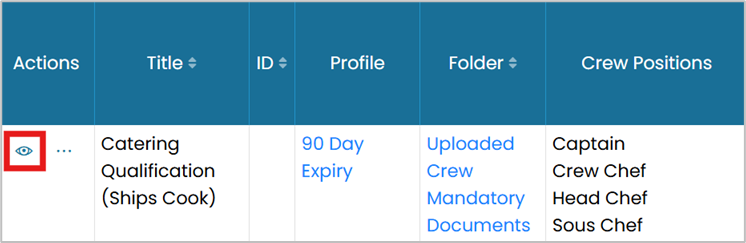
Click the View icon next to a document - Edit
Click Edit in the top-right corner.

Click Edit in the top-right corner - Make it visible
Check the box for Visible to Payroll Provider.

Check 'Visible to Payroll Provider' - Submit
Click Submit to save your changes.

Click Submit to save
Common questions
How do I make a mandatory document visible to the payroll provider?
Open Modules → Documents, go to Administration → Crew Mandatory Documents, click View Details on the document, click Edit, check Visible to Payroll Provider, and Submit.
Why control document visibility?
So you expose only the documents a payroll provider needs while keeping everything else private.
Where is the visibility setting?
On the Edit screen of a crew mandatory document, as the Visible to Payroll Provider checkbox.
Can I hide a document from the payroll provider again?
Yes — edit the document and uncheck Visible to Payroll Provider, then Submit.
Which documents does this apply to?
Crew mandatory documents managed under Administration → Crew Mandatory Documents in the Documents module.
Was this article helpful?
Still stuck on this step?
Our payroll support team will pick it up as a Zendesk ticket and reply by email.