
Document verification lets you confirm that crew documents are valid before payroll runs. First enable the feature, then set a verification status on each document.
Enable status verification
- Open Documents
Click the Modules icon and select Documents.
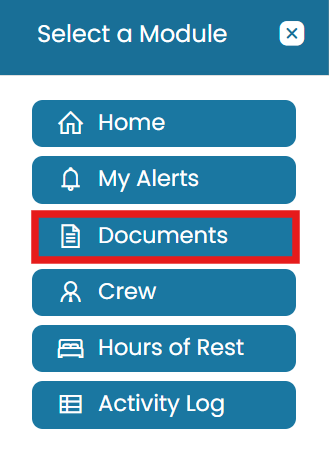
Modules → Documents - Open verification settings
On the blue ribbon, select Administration, then choose Document Verification Settings.

Administration → Document Verification Settings - Enable and submit
Check the box to enable Document Verification, then click Submit to save the changes.
Verify documents
- Review uploaded documents
From the Documents homepage you will see all documents uploaded by the crew along with their current verification statuses.
- Open a document
To update the status of a document, click the View Details icon.
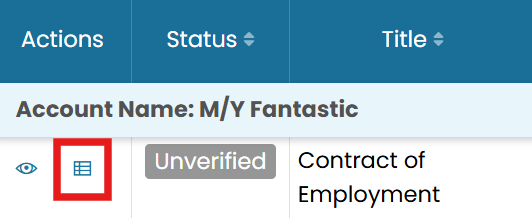
Open a document with View Details - Change the status
In the top-right corner, click Change Verification Status.
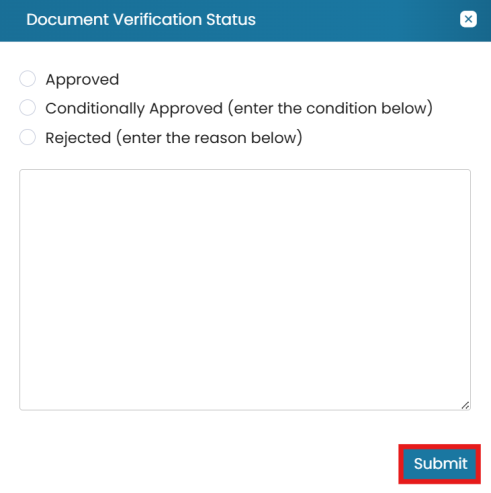
Change Verification Status, add a comment, Submit - Set status and submit
Select the appropriate status, enter a comment if needed, and click Submit.
Common questions
How do I enable document verification?
How do I verify a document?
Where do I see all crew document statuses?
Can I add a note when changing a status?
Do I need to enable verification before verifying?
Still stuck on this step?
Our payroll support team will pick it up as a Zendesk ticket and reply by email.