The Hours of Rest report helps ensure compliance with rest-hour regulations and lets you accurately track crew work and rest periods. You can generate a report for one crew member or for many at once.
Why it matters
Rest-hour records are a core MLC 2006 compliance artefact and are often requested during audits. Generate them per crew member or in bulk for the whole vessel.
Generate an individual report
- Open Hours of Rest
Click the Modules menu and select Hours of Rest.
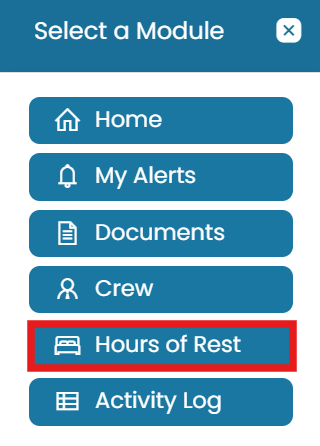
Modules → Hours of Rest - Generate for one crew member
Click the Generate Hours of Rest Report icon next to the crew member's name.
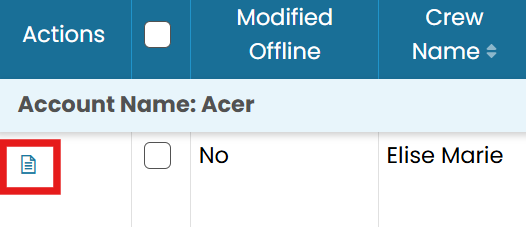
Generate a report for one crew member
Generate multiple reports
- Select crew
Select the checkbox next to each crew member's name.
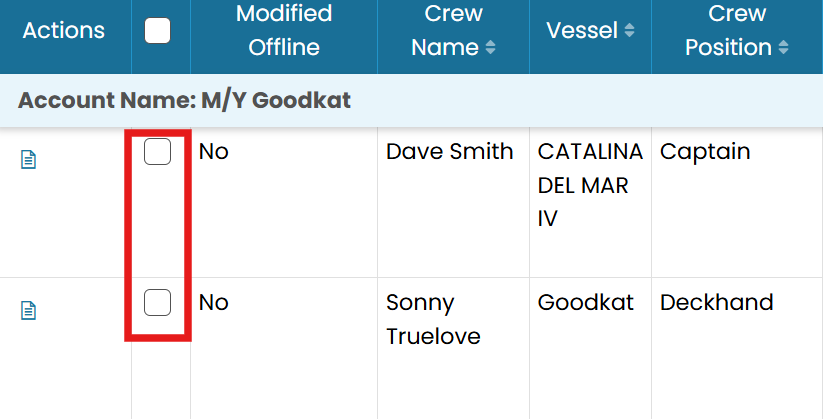
Select multiple crew with the checkboxes - Generate selected
In the top-right corner, click the three dots and select Generate Selected Hours of Rest Report.
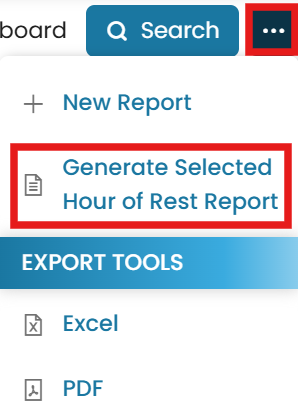
Generate Selected Hours of Rest Report
Common questions
How do I generate an Hours of Rest report for one crew member?
Open Modules → Hours of Rest and click the Generate Hours of Rest Report icon next to the crew member's name.
How do I generate reports for several crew at once?
Select the checkbox next to each crew member, then click the three dots in the top-right and select Generate Selected Hours of Rest Report.
Why generate Hours of Rest reports?
They evidence compliance with rest-hour regulations (such as MLC 2006) and are commonly requested during audits.
Can I run the report for the whole vessel?
Yes — select all crew members and use Generate Selected Hours of Rest Report for a bulk run.
Where do I find the Hours of Rest module?
Click the Modules menu and select Hours of Rest.
Was this article helpful?
Still stuck on this step?
Our payroll support team will pick it up as a Zendesk ticket and reply by email.