The Activity Log records all actions performed by users within the system — a complete audit trail that is invaluable for compliance reviews and investigating who changed what and when.
What the activity log is
Every action in the portal is logged. Use it to reconstruct the history of a payroll run or verify an approval.
Filter and export the log
- Open Activity Log
Click the Modules menu and select Activity Log.
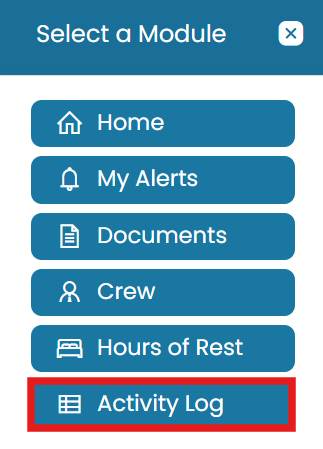
Modules → Activity Log - Filter
Use the Search button to filter the information displayed on the dashboard.
- Export
Export the data by clicking the three dots and selecting either Excel or PDF.
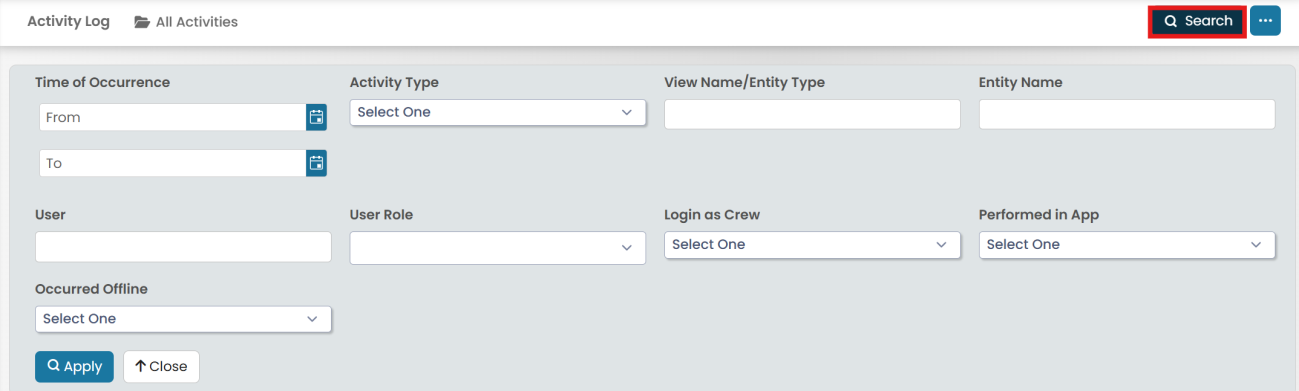
Filter with Search, then export to Excel or PDF
Common questions
What is the Activity Log?
A complete audit trail that records all actions performed by users within the system — useful for compliance reviews and investigating changes.
How do I filter the activity log?
Open Modules → Activity Log and use the Search button to filter the information displayed on the dashboard.
Can I export the activity log?
Yes — click the three dots and select either Excel or PDF to export the data.
Can I see who approved a payroll run?
Yes — the activity log records user actions, so you can reconstruct the history of a run including approvals.
Where is the Activity Log?
Click the Modules menu and select Activity Log.
Was this article helpful?
Still stuck on this step?
Our payroll support team will pick it up as a Zendesk ticket and reply by email.