
Add the currencies you pay crew in so multi-currency runs and FX are handled correctly. Currencies must use the standard three-letter ISO code.
Add a currency
- Open Currencies
On the blue ribbon, click Administration and select Currencies.
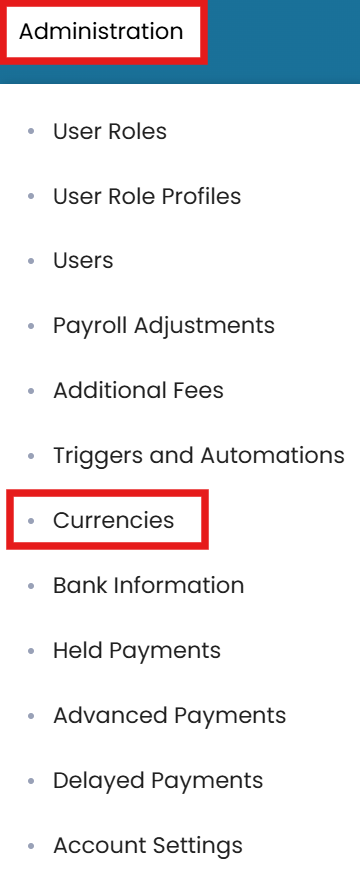
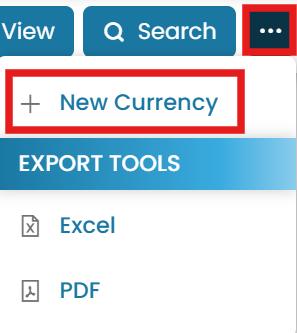
Administration → Currencies → New Currency - New currency
Click the three dots and select New Currency.
- Enter the code and submit
Enter the currency name and click Submit to save your changes.
Enter the three-letter ISO code and Submit
Codes and system currencies
A gear icon indicates a built-in system currency, which cannot be deleted.
Common questions
How do I add a currency?
Go to Administration → Currencies, click the three dots and select New Currency, enter the three-letter ISO code, and Submit.
What currency format should I use?
Always use the standard three-letter ISO code (for example USD, EUR, GBP). This is the format accepted by financial institutions, not the full currency name.
Why can't I delete a certain currency?
A gear icon marks a built-in system currency, which cannot be deleted.
Does MMV support multi-currency payroll?
Yes — add each currency you pay in and the system handles multi-currency runs and FX accordingly.
Is there a video for adding currencies?
Yes — the Adding Currencies article includes a short video walkthrough.
Was this article helpful?
Still stuck on this step?
Our payroll support team will pick it up as a Zendesk ticket and reply by email.