
Additional fees are charges applied for payroll-related services and transactions that are not linked to a specific crew member. They are not part of an employee's earnings or deductions, but they may affect the total payroll cost and are included in the funding request.
The three fee types
- Fixed Amount — use when the default fee amount can be predetermined. The value can still be modified when the payroll status is changed to Submitted for Funding.
- Variable Amount — use when the fee amount cannot be predetermined. The value is entered once the status is changed to Submitted for Funding.
- Fixed Percentage — use when the fee is calculated as a percentage of the total payroll amount. The value can also be modified at the Submitted for Funding stage.
Add an additional fee
- Open Additional Fees
On the blue ribbon, click Administration and select Additional Fees.
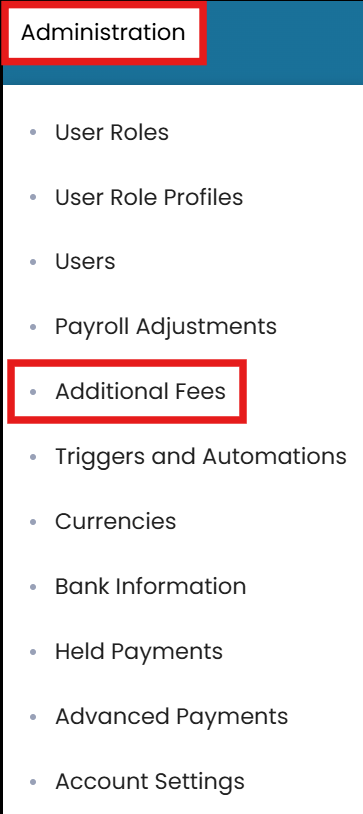
Administration → Additional Fees, then Edit - Edit
In the top-right corner, click Edit.
- Name and choose a type
Enter the title for the fee and select the appropriate fee type (Fixed Amount, Variable Amount, or Fixed Percentage).
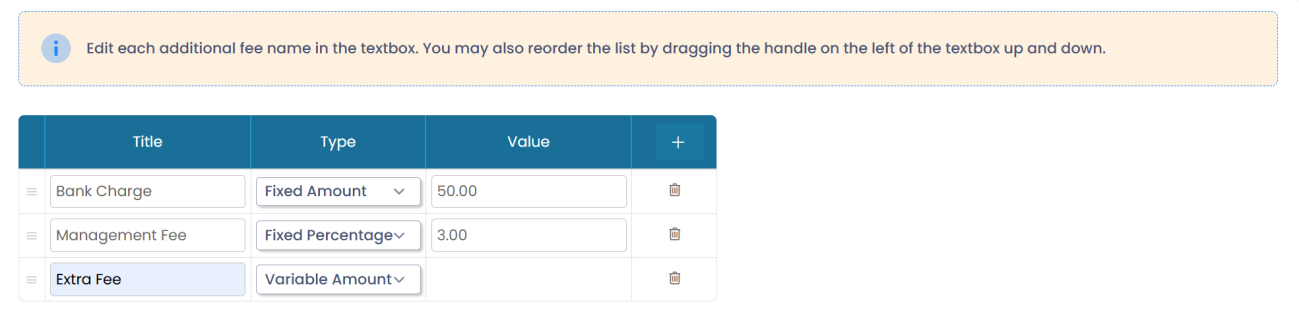
Name the fee, choose its type, and enter the value - Enter the value and submit
Enter the value in the designated field and click Submit.
Common questions
What are additional fees?
Charges applied for payroll-related services and transactions that are not linked to a specific crew member. They are not part of earnings or deductions but may affect the total payroll cost.
What are the three fee types?
Fixed Amount (predetermined, still editable at Submitted for Funding), Variable Amount (entered at Submitted for Funding), and Fixed Percentage (a percentage of total payroll, editable at Submitted for Funding).
How do I add an additional fee?
Go to Administration → Additional Fees, click Edit, enter a title, choose the fee type, enter the value, and Submit.
When are additional fees included in funding?
Once the payroll sheet status is changed to Submitted for Funding you can confirm the fees, and they are then included in the funding request.
Which fee type should I use for a percentage charge?
Use Fixed Percentage — it is calculated as a percentage of the total payroll amount.
Was this article helpful?
Still stuck on this step?
Our payroll support team will pick it up as a Zendesk ticket and reply by email.